This post is for beginners who want to try bots and Mini Apps but are afraid to dive into code, and for business owners who need automation without unnecessary costs.
We'll look at when you can easily do without programming, what launch options exist and when you really do need a developer. At the end, there's a simple checklist to help you stop overthinking and get down to business.
The short answer: no, you don't always need to code. If you want to test an idea or build a catalog, a booking flow, a mini store, a questionnaire, a personal account or a simple funnel inside Telegram, a no-code builder is usually enough. Code is typically needed when a project is non-standard, large or relies on complex logic that can't be assembled from ready-made blocks.
What is a mini app
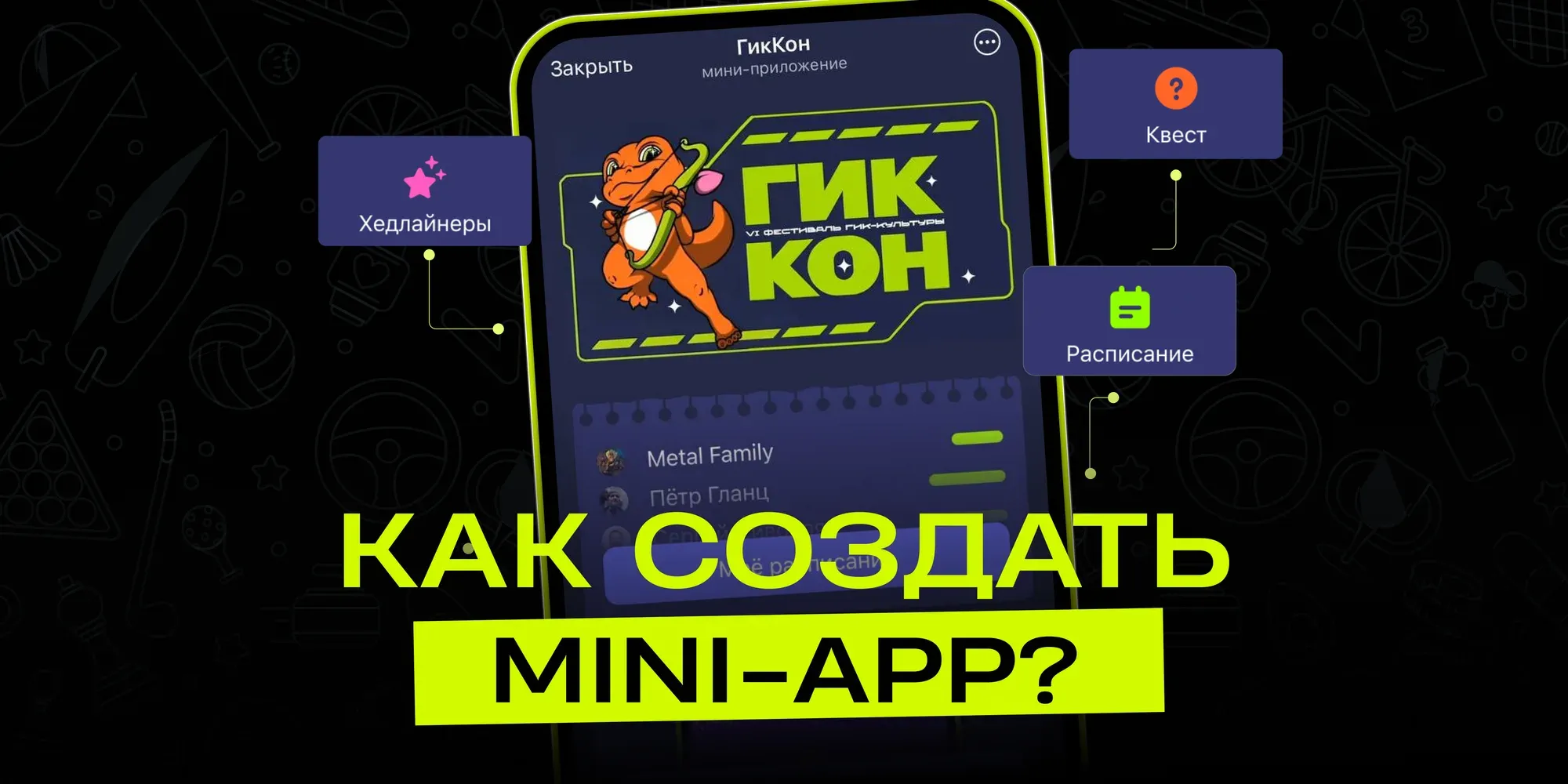
A mini app opens right inside the messenger. The user doesn't need to go to the App Store or Google Play, download a separate app, sign up again and get used to a new interface. They tap a button in the bot or a link in a chat and land exactly where they need to be.
Put simply, a Mini App is a small service inside Telegram. It feels a bit like a tiny website, except it runs inside a familiar environment and works well together with bots, channels, broadcasts and payments.
The examples are simple and down-to-earth:
a coffee shop sets up a menu and pre-ordering in Telegram;
an expert takes consultation bookings through a form;
an online school collects applications, hands out materials and shows the schedule;
a store publishes its catalog, cart and checkout;
an event organizer collects registrations;
a service company takes requests and passes them on to a manager.
That's exactly why Telegram Mini Apps have caught on so well in business. They aren't meant for spending years building a "big app" — they're meant for quickly solving a specific task.
And yes, a mini app doesn't have to be huge. Most often, the best first launch is one clear scenario: book, buy, submit a request, take a quiz, choose a product or get access.
What about other messengers?
Right now, most of the demand is for Telegram. The reason is simple: it already has bots, channels, groups, payments, links and users who are used to talking to businesses right in the messenger.
A similar approach is emerging in other ecosystems too. For example, MAX apps could also become a viable direction for businesses if audiences start actively using built-in services.
But at the start, it makes more sense to go where the infrastructure is already in place and the tools are clear. So from here on, we'll mostly talk about Telegram and no-code.
Three ways to build a mini app
If you're asking yourself how to build a mini app, there are essentially three options: write everything yourself, assemble it in a no-code builder or hand the job to a contractor. All three work. The only question is which one suits you.
Option 1. Build it with code
Developing from scratch means a programmer builds the app. You usually need HTML and CSS for the interface, JavaScript or TypeScript for the logic, a Node.js or Python backend for data processing, a database and an understanding of the Telegram Bot API.
In non-technical terms: you're not just placing buttons. You're building the entire system and are personally responsible for making it work.
The upside is obvious: you can build almost anything. Any design, unusual mechanics, your own integrations, your own architecture.
The downsides are just as obvious:
a beginner will need several months to confidently build even something simple;
bugs in the code can break payments, requests and access;
you need hosting, a database, testing and maintenance;
every change depends on a developer's time.
This path works if you're a startup with a technical partner, have a complex product or a decent budget for a team. But if the goal is to quickly test an idea or automate a straightforward process, starting with code is usually too heavy.
Option 2. A no-code builder
No-code means building without programming. Instead of writing code, you work in a visual editor: add pages, buttons, forms, images, transitions, conditions and actions.
It feels closer to putting together a landing page or a presentation than to classic development. You don't write everything from scratch — you assemble the logic you need from ready-made elements.
For example, puzzlebot lets you work with both bots and Mini Apps in one system. To get started, plan out your scenario, create a bot via BotFather, get a token and connect it to the Constructor. Then you set up the start page, buttons, forms and transitions, and check the result in Telegram right away.
This approach is especially handy if you want to figure out how to make a mini app without coding but aren't ready to spend months learning to program.
What people usually build with no-code:
a request form;
a quiz or questionnaire;
service booking;
a product catalog;
a mini store;
a personal account;
event registration;
a lead nurturing funnel;
delivery of materials;
a customer service section.
In practice, a no-code mini app is the most sensible first step for beginners and small businesses. You see results quickly and can change the scenario yourself instead of waiting for a developer over every little thing.
Option 3. A contractor or freelancer
The third path is to hire a specialist. You describe the task, and they design and build the app.
This is convenient if you don't have time to learn even a builder. Or if the task is noticeably more complex than usual: a custom design, lots of integrations, a serious database, access rights, high load.
But there's an important catch: a contractor doesn't relieve you of the need to think. You'll still have to explain what should happen in the app, what buttons there will be, what data to collect, where to send requests and who will maintain it all later.
The main risk is dependence on the contractor. A month later, you want to change a form, add a section or fix a bug — and once again you have to write to them, wait for an estimate, and agree on timelines and cost.
Comparing the options
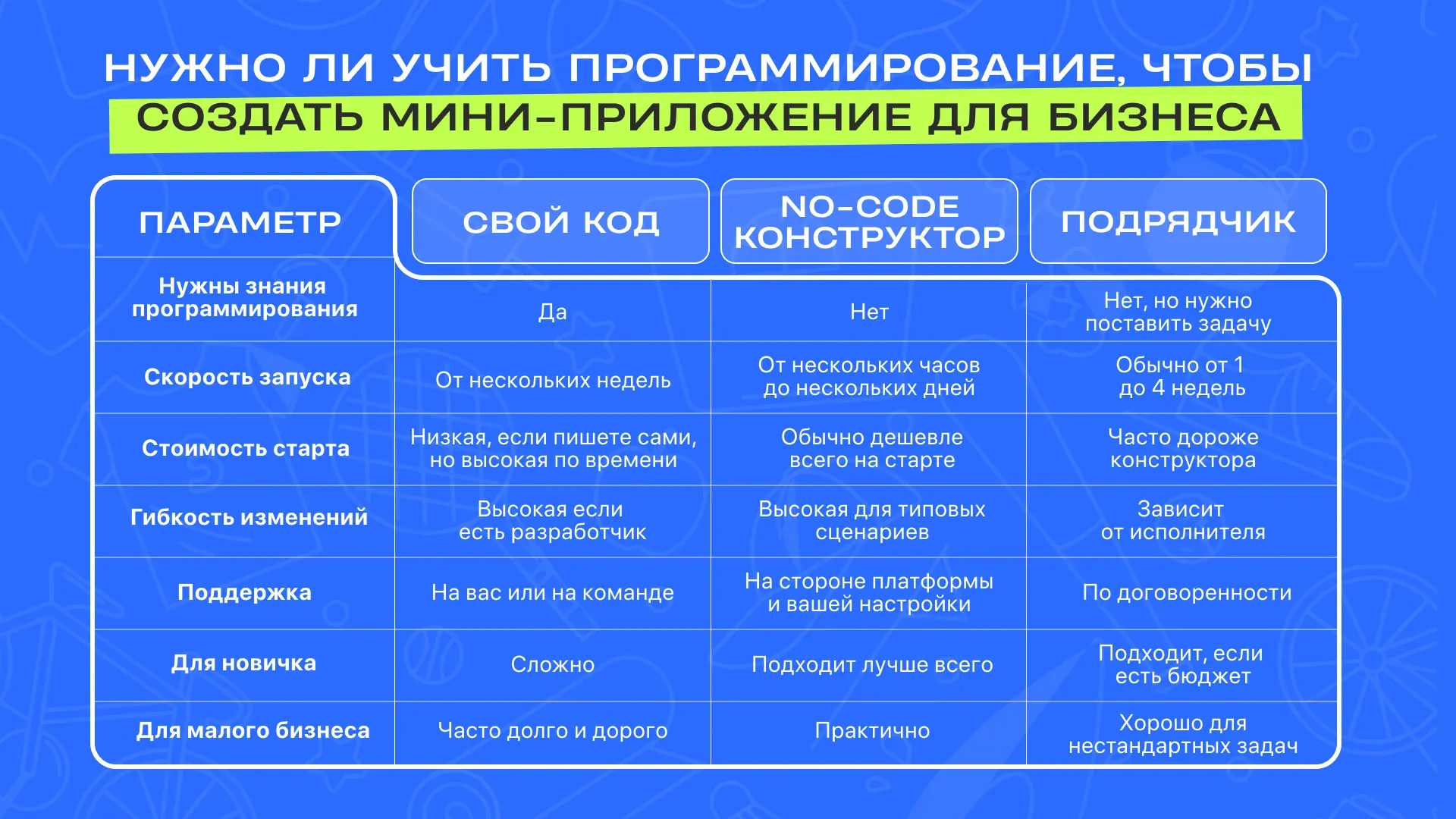
Keep in mind: saving on development isn't just about money. It's also about the owner's time, how fast you can test an idea, the cost of mistakes and the ability to change things quickly if the first version doesn't take off.
When you do need programming
Code isn't evil. You just don't always need it at the start.
It's worth thinking about programming if:
your product has very non-standard logic;
you need integrations that builders don't offer;
the app has to handle a heavy load;
you're building a long-term IT product rather than a supporting tool for your business;
you already have a developer or a technical partner;
you've hit the limits of no-code and know it from real tasks, not just a hunch.
But if you're making a mini app to automate your business — collecting requests, bookings, a catalog, broadcasts, access to materials, registration or customer support — you usually don't need to start with code.
This scenario is actually very common: an entrepreneur spends weeks thinking about "serious development", gathers requirements, looks for a programmer and compares quotes. Then it turns out the first working version could have been built in a builder over a weekend and already bringing in requests. It happens all the time.
Why no-code is enough in most cases
For small businesses, a mini app rarely starts with some special technology. The request is usually much simpler:
take requests without endless back-and-forth;
show a product catalog;
book clients for services;
hand out a bonus or material;
collect event registrations;
run a survey;
segment the audience;
send data to a manager;
reduce the number of repetitive messages.
You don't need an engineering team for this. You need clear logic and a tool that lets you quickly build a working scenario.
How to choose a bot builder
If you're comparing different services, don't look only at the price. A cheap tool can easily turn out to be inconvenient if it's hard to change scenarios or it lacks the features you need.
Check five things.
Can you build both a bot and a Mini App in one place?
This is convenient because Telegram scenarios are almost always linked. The bot sends messages, guides users through the funnel and sends notifications. The Mini App provides the interface: a form, a catalog, a personal account, cards, buttons.
How easy is the visual editor to understand?
If you're a beginner, the interface should help, not intimidate. A good builder lets you literally see the logic: here's a button, here's a transition, here's an action, here's the result.
Does it have the blocks you need?
Businesses usually need forms, buttons, pages, conditions, broadcasts, integrations, payments, analytics and data handling. You don't have to use everything at once, but having room to grow definitely won't hurt.
Can you test quickly?
A mini app should be tested on a phone, right in Telegram. Everything may look neat on a computer, but suddenly become awkward on a mobile screen.
Is there support and a knowledge base?
When someone is just starting out, it's important to know they're not alone with the interface. Documentation, learning materials, a community and tech support really do speed up the launch.
What you can automate with a Mini App
Automating with a mini app doesn't mean replacing your whole business with a robot. It's usually about something more modest and useful: handing off to the system the repetitive actions people waste time on.
For example, a manager answers the same questions every day: "How much does it cost?", "What services do you offer?", "How do I book?", "Where do I pay?", "When does it start?". A Mini App can show the right information, take the user's choice and pass the request on.
Mini apps like these remove manual routine where a human doesn't add much value. A manager should be selling, explaining complex things and helping in unusual situations — not copying the same link twenty times a day.
It helps to ask yourself one question here: which repetitive action do we want to eliminate or speed up? Once you have the answer, choosing the mechanics is much easier.
A simple checklist: which path to choose
Answer a few questions.
Do you have no programming experience?
If so, start with no-code. A mini app you build yourself in a builder will do you more good than a month of learning syntax with no clear result.
Do you need to launch quickly?
If your deadline is a few days or a week, go with the no-code option. Development by a programmer almost always takes longer.
Is it a typical task?
Forms, catalogs, bookings, registration, quizzes, broadcasts, delivering materials — this is standard builder territory.
Do you need to test a business idea?
Build a simple version first. It's better not to put a big budget into something no one has tested on real users yet.
Is the logic complex and non-standard?
Then it's worth looking at a contractor or your own developer. But even then, it helps to build a prototype in no-code first so you don't have to explain the idea with hand-waving.
Do you want to grow as a specialist?
Then starting with a bot and Mini App builder is a good move. You learn to build scenarios, understand business needs, launch funnels and show results, even if you don't write much code yet.
The bottom line
You don't have to learn programming languages to build your first Mini App. For most small business tasks and for beginners, a no-code builder is usually enough.
Code is needed when you're building a complex product with unique logic. A contractor is needed when you have the budget but no time to handle the launch yourself. And no-code is a good choice if you want to quickly test an idea, launch a mini app, automate a straightforward process and not depend on a developer for every change.