Continuing the article Developer's Checklist, adding to the list of recommendations on how to optimize your work💪

1️⃣Ability to share a link to the bot
It is nice when subscribers recommend the bot to their friends. Let's simplify the procedure for them by creating template messages for forwarding. You can go further and make a full-fledged referral system, count the % of those who came by recommendation and understand how valuable the bot is to people.
You can also reward those who shared the bot with points or cashback. It is even more effective to reward not for a subscription, but for a targeted action - subscribing to a channel, making a purchase, and so on.


2️⃣ Using template images in a project
Blocking images
It happens that the customer does not provide images for the bot immediately - you need to find, select and edit them. Therefore, most often we have to upload random images from the Internet at the stage of assembly, but much more professional look their own, created in company colors or with the logo.
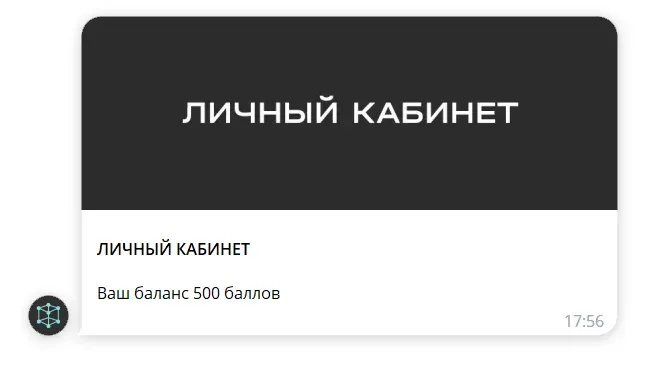
3️⃣ Customizing the response to an unknown command
If a subscriber sends information to the bot for which the response is not customized, the bot will generate a system phrase:

Customize your reply in your own style, you can have a picture, sticker, buttons. For example:

Why do you need such a command? This is where you give information about options if something went wrong. For example, a list of available commands, description of key errors, contacts, and so on.
4️⃣ Hide info in articles
It's good when information in a bot is presented in small portions so that the subscriber doesn't have information overload. But what to do if there is a lot of information and it is important to place it? Hide it in articles by link. If you do it through Telegraph service, the transition will be as seamless as possible and the bot will not ask the subscriber if he is ready to follow the link.

On the screenshot are links to articles in the Telegraph, to the calendar for booking on the site and a point on the Yandex map. Data is unloaded from the table via google slider.
5️⃣Possibility to leave feedback in the bot
Feedback can be collected at various stages, for example, on the first day of getting acquainted with the functionality or when a key event occurs. The screenshot shows a review that was requested when a tenant was evicted from a rental property.
All feedback is stacked into a connected group for notifications, which the entire project team can see. From there, you can take feedback to design and post on social media.

6️⃣Links to the author's social networks
A simple but important step is to introduce your subscribers to the bot author - don't forget to leave all the necessary contacts of the bot author and information about him. If there is an article describing the path of a specialist, be sure to post it too.

7️⃣ Think through a series of emails in the bot
It's a good idea to think through a small series of emails after subscribing. This can be purely expert content or a content funnel for a sale. Ideally, such content reveals the value of the product and shows results.
8️⃣ At each unsubscribe and stop point, think through questions
This idea is already for the advanced - often people don't write about what's wrong, what they didn't like, and this is valuable information. Therefore, if a subscriber unsubscribed from a newsletter or stopped a bot, you can set up a notification about it to a connected group, so that you can communicate in private and find out the reason.


AFTER STARTING
It would seem that the bot is assembled, long live the bot 😄 we can exhale. We have a few more important steps to take.
9️⃣ Explore the path in Dialogs
When the bot has been handed over, it's time to see in Dialogs how subscribers actually go through our path. You will see where they stumble, where they leave the route or stop the bot.
🔟 Collect and finalize analytics
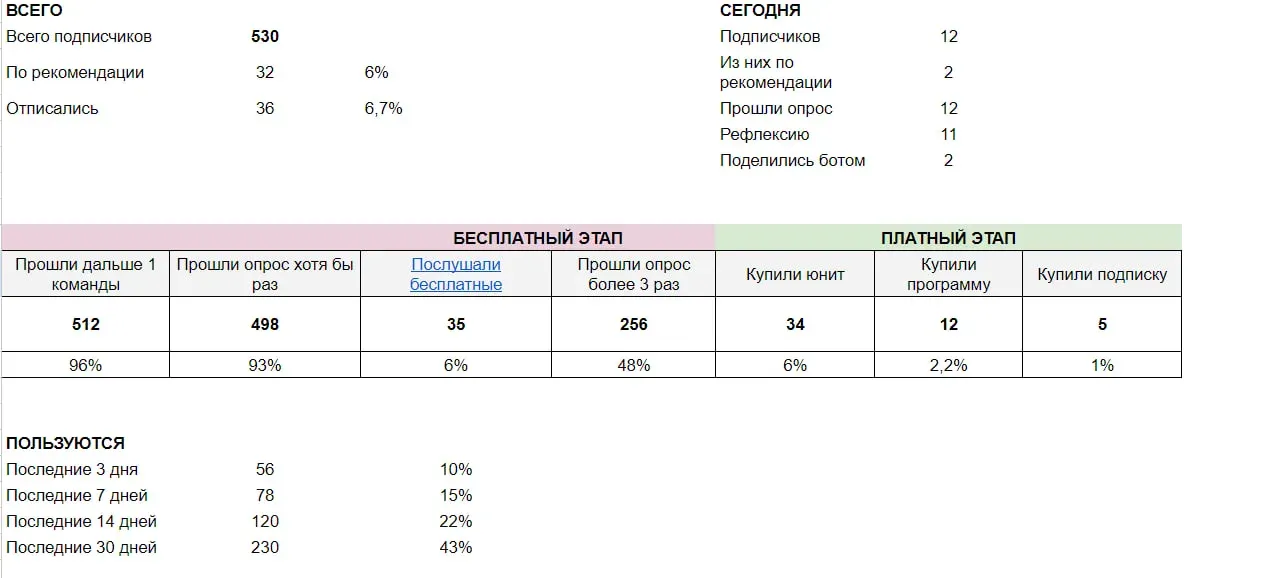
It's good if you can summarize the variety of data into a simple yet informative table. Here is an example of an outline for collecting analytics. Thanks to integration with google table and scripts, we can customize regular data updates and see an up-to-date picture. With all the metrics in front of our eyes, there is an understanding of which metrics need to be tightened up. In an ideal world, designing a bot is a cool place to start with a table like this😄
1️⃣1️⃣ Carry out an automatic senddev in a bot
You can guess endlessly about what features are needed and what needs to be improved, or you can ask your subscribers. The easiest way is to make a mailing list of 3 questions:
- What did you like about the bot?
- What was unclear and should be improved?
- What else would you like to see in the bot?

We collect the answers in a table and highlight the useful ones when studying them. Some subscribers are so invested in the text that it makes sense to contact them separately and discuss ideas. It is good to do such a newsletter if you have at least 500 subscribers, and preferably at least 1000. According to statistics, about 5-10% are ready to give feedback.
1️⃣2️⃣ Coordinate refinements based on analytics and castdev
The first version of your bot will be built on hypotheses of you and the customer, the reality will come later. And in the process of building, new ideas for implementation may have emerged. Collect feedback from people, talk to them personally, analyze data, study dialogs and discuss with customers the second stage of work on the bot.
1️⃣3️⃣ Write a case study for the website and your networks
The easiest way to get orders is to show the results of your work. Many people underestimate the importance of this point - just send a link to the bot and let them look at it, but most of the work is usually not visible from the outside. You can see an example of a simple case study with good detail here. This kind of design will allow you to justify the cost of the work. At this link you can explore the catalog of bots with a description of functionality. Want to place your case study in our blog? Leave a request through the active users bot.
1️⃣4️⃣ Create training materials for the customer
Most questions from customers are similar, such as:
- What does the cost of the bot consist of
- What stages the work consists of
- Possibilities of chatbots
Therefore, it is logical to create your billets over time in video audio with slides or just voice messages . These questions will be relevant already at the stage of building the bot:
- How to choose a name for the bot and register it
- How to connect google table to the project
- How to give access to bot administrator
1️⃣5️⃣ Reward yourself for the work done, take a rest.
Remember that a rested brain is an efficient brain. In our business, we are often faced with intense intellectual activity and can easily burn out if we don't give ourselves a rest and praise ourselves for the hard work we've done.
Bot to help 🖖
Author Irina Zakharova