In this article, Vladislav Serebertsev explains how to build a bot that automates a company's business processes, tracks working hours and routes requests to the right departments.

The bot's structure in the Constructor
What the bot does:
This bot is an internal tool for staff. It fully or partially automates handling requests and organizing guest check-ins and check-outs at the residences.
How the bot works:
1. Restricted access.
The bot is closed: it can only be activated through a specific link. Users must register and state their position, and an HR specialist approves or rejects them. Approved users receive a verification message and get access to the bot features for their own department.
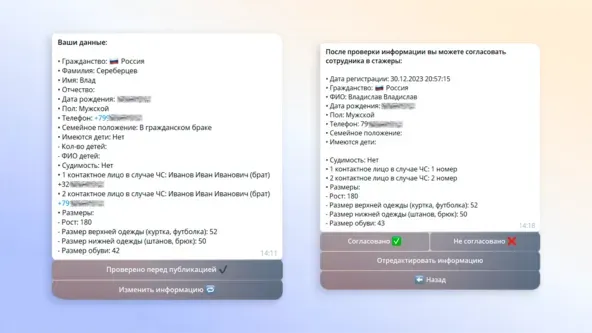
Registration form in the bot
2. Custom features for each department.
There are 13 departments, each with its own set of features. For example, a manager can dismiss any employee or close any request, while a technician can only create and handle requests for their own department. Below we cover only the key mechanics.

Different features for different employees
3. Tracking the working day.
Every employee except managers starts and ends their working day in the bot. Only after starting the day can they work with the bot.
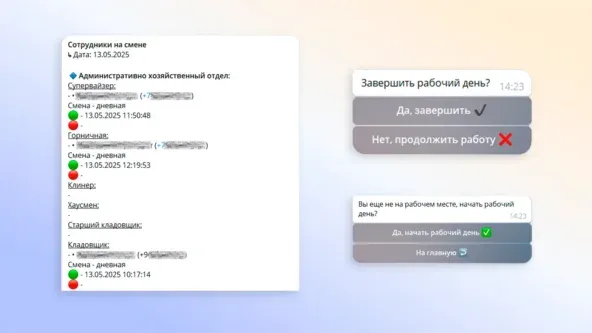
A daily notification about employees on shift, and the start and end of the working day
4. Handling requests.
Broadly, the bot has two groups of users: management and line staff. For line staff, we created a forum where requests arrive by department. Requests have 4 statuses: open, in progress, problematic and closed. Management has its own topic that also receives requests, but only the "problematic" ones, so they can be resolved under the supervision of the department head.
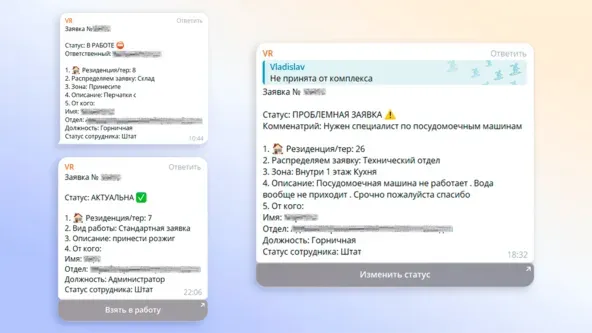
Different request statuses
5. Dedicated functions for each task.
Another key feature is handling check-ins and check-outs. A designated department creates check-in and check-out requests. The process then runs from the "Checked in" status to "Checked out". When guests check out, other departments join the request to handle it properly and, if needed, a damage request is created.
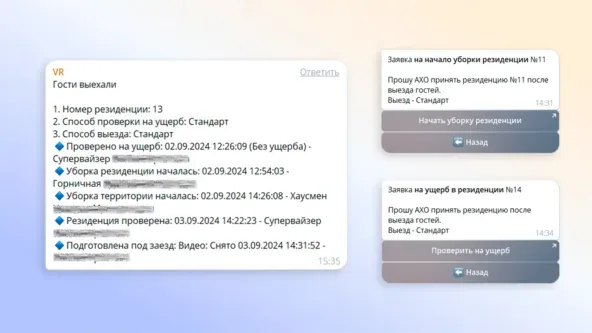
Guest check-out request
6. Database.
A project of this scale needs proper record-keeping. For this, we connected NocoDB: the database is table-based and integrates with the bot intuitively. Data can be exported from it, which lets you build analytics across all functions, from user registration to request handling.

NocoDB database
The result is a CRM-like system tailored to the business, covering everything from guest check-in to handling check-out requests.
Want to ask an expert a question? Leave it in the comments under the latest post in our channel, and the most interesting ones will be covered.